
CallApp: Caller ID & Block
CallApp Caller ID, Call Recorder & Spam BlockerCommunication
4.349.21K Reviews
- Version
- Varies With Device
- Installs
- 100.00M
- Age Rating
- Everyone
Screenshots


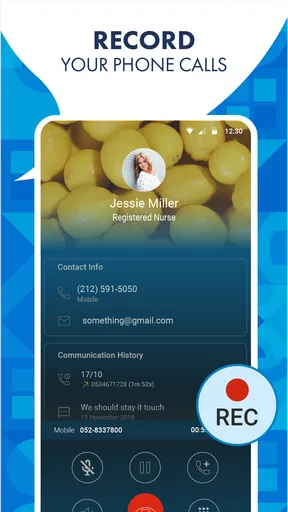
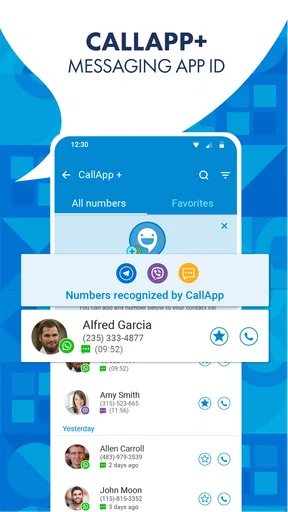
Our Review of CallApp: Caller ID & Block
 Analysis by Appyee
Before installing a call-management app, I’d ask a practical question: do unknown callers interrupt me often enough to justify adding another tool to my phone? CallApp: Caller ID & Block is aimed at people who want more context when a number appears and a way to handle calls they would rather not receive. It is a free communication app from CallApp Caller ID, Call Recorder & Spam Blocker, and its appeal is the combination of caller identification, blocking and other call-related tools rather than a single-purpose dialer.
What the free option means in practice
The app is free to install, so trying its basic call-management approach does not require an upfront payment. It also offers in-app purchases, with listed item prices ranging from $0.99 to $149.99. That is a broad range, not a promise that every useful feature requires payment; I would check the specific purchase details shown in the app before paying. The sensible way to judge value is to start with the free experience and decide whether a particular extra solves a problem you actually have.
That distinction matters because a caller ID app is only worth paying for if it changes a real routine. If you mainly want a second opinion before answering unfamiliar numbers, the free starting point may be enough. If you are considering a paid option for a particular tool, weigh its cost against how often you would use it, rather than assuming that a larger bundle is automatically better.
What it can add to a busy phone
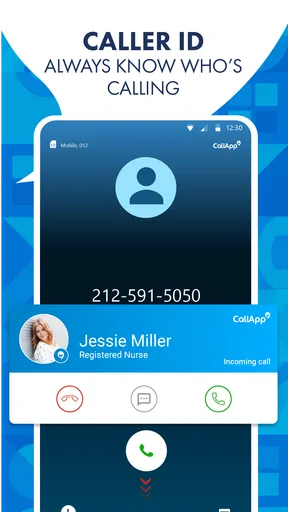
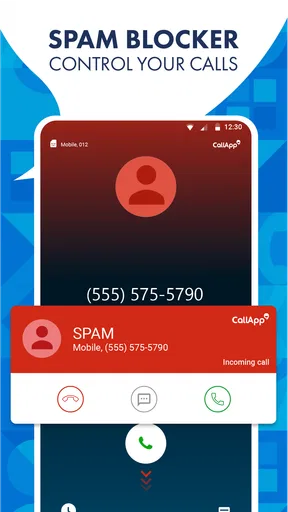
The clearest value is reducing the guesswork around incoming calls. A number you do not recognize can be a legitimate delivery, a work contact, or an unwanted interruption. Caller identification can help you make a quicker choice, while blocking gives you a response when a call is clearly not welcome. That combination is more useful than a blocklist alone: it gives you a chance to decide before treating every unfamiliar number the same way.
A realistic example is a day when you are expecting a call from someone whose number you have not saved, while also receiving repeated unwanted calls. The useful workflow is to look at the caller information first, answer when there is a good reason, and block only the numbers you have decided you do not want to hear from again. That small pause can help avoid the opposite mistakes: ignoring a potentially important call or answering every interruption just in case.
Call management is also not just about stopping calls. The app includes a contact manager, so someone dealing with duplicate entries or a cluttered address book may find a separate benefit there. I would treat that as a housekeeping tool, not a reason on its own to replace the phone’s usual contacts app. Its value depends on whether your contact list has a problem you want to fix.
Where it sits beside built-in tools
Most phones already provide basic ways to silence or block numbers, and those built-in controls are a sensible choice if you only need to reject a few repeat callers. They keep call handling simple and avoid adding another layer to your routine. CallApp makes more sense when you want identification alongside blocking, or when its additional call and contact tools are relevant to you.
Compared with a narrow spam-blocking utility, this app tries to cover more of the call experience. That breadth can be convenient because caller details, call handling and contact cleanup sit together. The trade-off is that a broader app may ask you to learn more screens and decide which options matter. If all you want is a basic block button, the phone’s existing tools may be less distracting; if you often need context before answering, a more feature-rich option has a clearer case.
I would also avoid treating caller identification as certainty. Names or other details can help, but they should be a prompt for judgement rather than proof that a caller is genuine. For sensitive requests, I still prefer to verify the person through a known contact route instead of trusting a label on an incoming call. This is a useful habit with any caller ID service, not a reason to dismiss the feature.
Who is likely to appreciate it
CallApp is a better fit for people who regularly receive calls from numbers they have not saved and want more than the standard call screen offers. It may also suit someone who likes having a contact-cleanup tool and call-related extras in one app. Its broad adoption—over 100 million installs, with a 4.3 average from around 1.7 million ratings—suggests that this style of call management has wide appeal, though popularity is not a substitute for checking whether its approach fits your own needs.
I would be more cautious if you rarely receive unwanted calls, prefer to keep your phone close to its default setup, or do not want to spend time reviewing an app’s options. Likewise, if your only goal is to block one persistent number, installing a larger utility may be more than you need. The app is free to begin with, but your time and attention are still part of the cost of adopting any additional tool.
It is rated for Everyone and has been available since September 13, 2012. Those details tell me it is an established, general-audience app, but they do not remove the need to make your own choices about what call information you trust or which features you use. The minimum operating system is Android 8.0, so Android users should check that their device meets that requirement before trying to install it.
One practical tip is to begin with the job that brought you to the app. If caller identification is your priority, try that part first and see whether it changes your decisions about unfamiliar calls. If contact cleanup is the draw, review any suggested changes before applying them, especially when merging entries. Taking one feature at a time makes it easier to see whether the app is genuinely helping instead of enabling everything simply because it is available.
A sensible way to judge its value
I would not install it expecting every unknown call to become easy to classify. Caller details can be useful context, but they cannot make the decision for you, and an app that offers several tools may feel unnecessary if your call habits are already manageable. Nor would I pay for an extra until I understood exactly what that purchase adds and knew I would use it regularly.
The strongest case is for someone who wants a more informed choice at the moment a call arrives, plus the option to block unwanted callers and tidy contacts. The weaker case is for someone who wants the simplest possible phone setup or only needs an occasional block. Since the app is free to start, you can assess that fit without an initial purchase; just keep any paid extras tied to a clear need.
Ever found yourself squinting at your phone screen, wondering who’s calling? I totally get it. In the era of endless spam calls and unknown numbers, having a trusty sidekick like CallApp: Caller ID & Block is a game changer. It’s like having a personal assistant who knows everyone and isn’t afraid to block those pesky intruders. Let me walk you through my experience with this app.
Getting Started with CallApp
First things first, downloading CallApp: Caller ID & Block was a breeze. Available on both Android and iOS, you can grab it from the Play Store or the App Store. Once you’ve got it installed, the setup process is pretty straightforward. Just a couple of taps and you’re ready to roll. What impressed me right off the bat was how intuitive the interface is. Even if you’re not a tech wizard, you’ll navigate through it like a pro.
Caller ID and Blocking Features
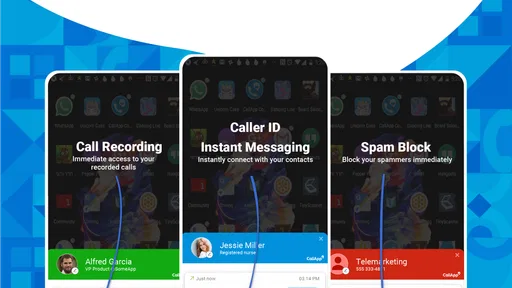
Let’s dive into the heart of the app: the Caller ID feature. I can’t tell you how satisfying it is to see the name pop up instead of just a number. You get details like name, photo, and even social media info. It’s like having a mini dossier on your caller. And when it comes to blocking? One tap and those unwanted calls are history. The app learns from your activity, so it gets better at spotting spam and robocalls over time. It’s like training a very efficient guard dog, minus the barking.
Additional Features Worth Mentioning
Now, let’s talk about the extras. CallApp isn’t just about blocking calls. It’s packed with features that make managing calls a breeze. There’s a call recorder feature which I found super useful. Whether it’s an important work call or just something you want to keep for reference, it records everything clearly. You can also customize your caller screen with themes and videos, adding a personal touch to your calls.
Another cool feature is the contact manager. It helps you organize and clean up your contact list, merging duplicates and getting rid of unnecessary clutter. It’s like a spring cleaning for your phone book.
User Experience and Performance
One of the things that stood out for me was how seamlessly the app integrates with my phone. I didn’t experience any lag or crashes, which is a huge plus. The app runs smoothly in the background without draining my battery. Plus, the notifications are spot-on without being intrusive. It feels like the app respects my space, popping up only when needed.
Privacy and Security
With all the data it handles, privacy is a big deal. I was relieved to see that CallApp takes security seriously. The app requires minimal permissions and keeps your data safe. It’s reassuring to know that while the app is helping you manage calls, your personal info isn’t being compromised.
Final Thoughts
All in all, CallApp: Caller ID & Block is a solid choice for anyone looking to take control of their call experience. It’s packed with features, easy to use, and just as handy as having caller ID back in the day on your landline. If you’re tired of dodging unknown numbers and want a reliable assistant to help manage your calls, this app is worth checking out. Trust me, once you try it, you’ll wonder how you ever lived without it.
So, ready to say goodbye to unknown calls and hello to a more organized phone life? Give CallApp a shot!
Privacy and Permissions
See what permissions an app requests and how it handles your data.
- Identity
- find accounts on the device, add or remove accounts, read your own contact card
- Calendar
- read calendar events plus confidential information, add or modify calendar events and send email to guests without owners' knowledge
- Contacts
- find accounts on the device, read your contacts, modify your contacts
- Location
- approximate location (network-based), precise location (GPS and network-based)
- SMS
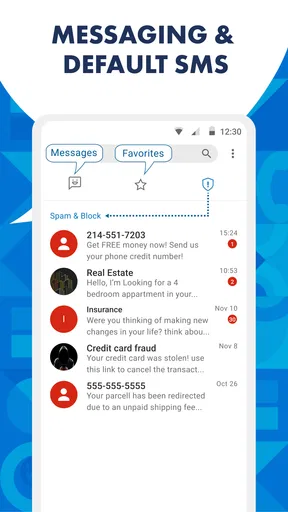
- read your text messages (SMS or MMS), receive text messages (MMS), receive text messages (SMS), send SMS messages, edit your text messages (SMS or MMS)
- Phone
- directly call phone numbers, modify phone state, reroute outgoing calls, read call log, read phone status and identity, write call log
- Photos/Media/Files
- read the contents of your USB storage, modify or delete the contents of your USB storage
- Storage
- read the contents of your USB storage, modify or delete the contents of your USB storage
- Microphone
- record audio
- Wi-Fi connection information
- view Wi-Fi connections
- Device ID & call information
- read phone status and identity
- Other
- view network connections, create accounts and set passwords, pair with Bluetooth devices, send sticky broadcast, disable your screen lock, full network access, change your audio settings, read sync settings, run at startup, reorder running apps, draw over other apps, use accounts on the device, control vibration, prevent device from sleeping, modify system settings, toggle sync on and off, set an alarm, install shortcuts, Google Play license check, read Google service configuration
Verdict
Strengths of CallApp: Caller ID & Block
- Accurate caller ID recognition.
- Efficient spam call blocking.
- Customizable call reminders.
- User-friendly interface.
- Integrates with social media.
Limitations of CallApp: Caller ID & Block
- Contains in-app advertisements.
- Limited features in free version.
- Occasional lag in call logging.
- Requires multiple permissions.
- Some features require premium.
Similar Picks in This Category
View All
Google Messages
Google LLC4.6

Gmail
Google LLC4.1

Google Meet
Google LLC4.4

Google Chrome
Google LLC4.1

WhatsApp Messenger
WhatsApp LLC4.6

Carrier Services
Google LLC4.2
You May Also Like
View All

Frequently Asked Questions
What features does CallApp: Caller ID & Block offer?
CallApp provides a comprehensive suite of features designed to enhance your calling experience. It includes caller ID to identify unknown numbers, call blocking to prevent unwanted calls, call recording, and contact management. Additionally, it offers social media integration, allowing you to view caller information from platforms like Facebook and LinkedIn.
Is CallApp: Caller ID & Block free to use?
Yes, CallApp offers a free version with essential features like caller ID and call blocking. However, there is also a premium version available that provides additional features such as advanced caller ID, ad-free experience, and enhanced call recording options. The premium version requires a subscription fee.
How does CallApp protect my privacy and data?
CallApp is committed to user privacy and employs various measures to protect your data. It uses encryption to secure your information and does not sell your data to third parties. You have control over your data sharing preferences, and the app complies with privacy regulations to ensure your information remains safe.
Can CallApp block spam calls effectively?
Yes, CallApp is designed to efficiently block spam and unwanted calls. It uses a vast, continuously updated database to identify and block spam numbers. Users can also manually block specific numbers, and the app provides real-time spam alerts to help you avoid potential scams and telemarketers.
Is CallApp compatible with all smartphones?
CallApp is compatible with most Android devices, requiring Android version 4.1 or higher. It is currently not available for iOS devices. The app is optimized to work smoothly on a wide range of smartphones, ensuring a seamless experience for users across different Android models.
